Metrics
Under SambaBox directory management, there are metrics that will be useful for system administrators. These metrics provide important information about the health and performance of the system.
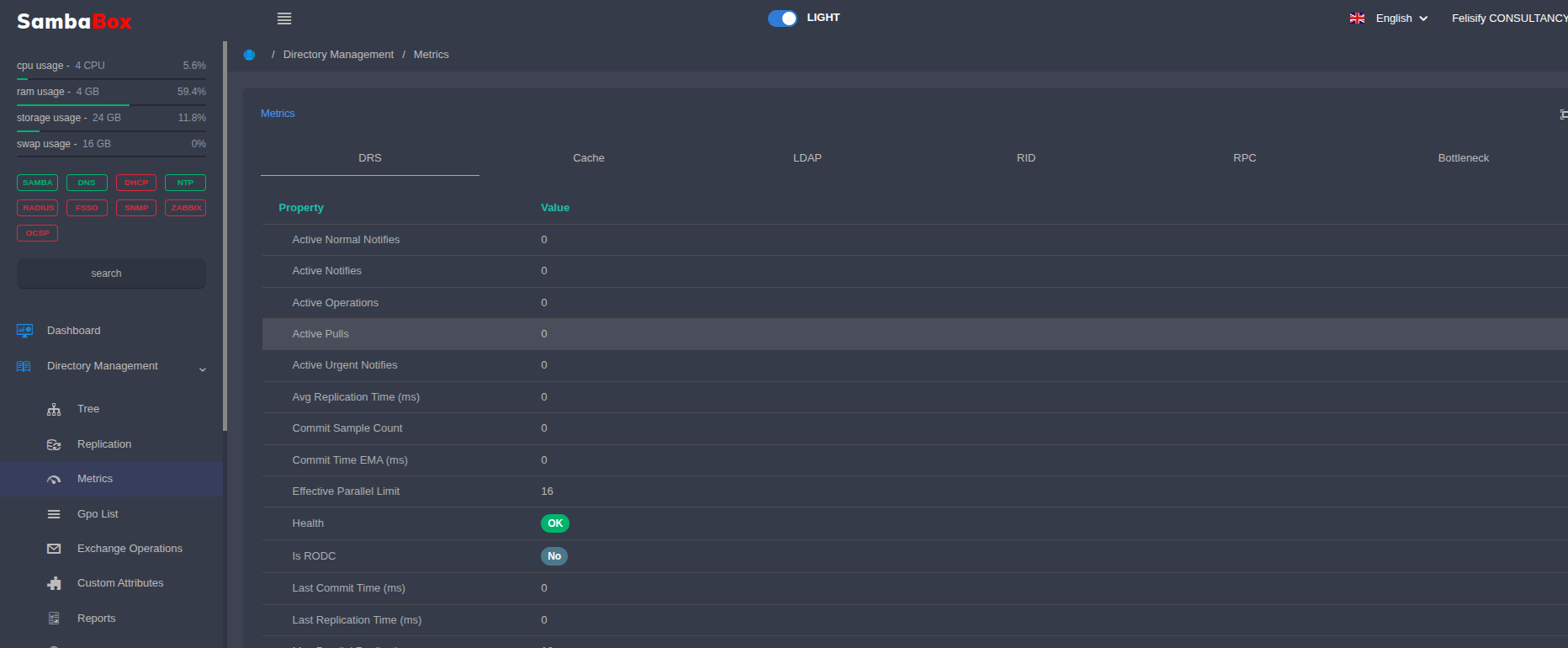
DRS
Displays Directory Replication Service (DRS) metrics. DRS is the core service that ensures data synchronization between domain controllers. It is responsible for keeping copies of users, groups, and other directory objects up-to-date across all servers.
Note
Active Normal Notifies: Displays the number of active normal-priority replication notifications.
These notifications are generated during standard directory changes. Modifications made to users, groups, or organizational units are propagated to other domain controllers using this mechanism.
High values may indicate intensive directory modification activity.
Active Notifies: Displays the total number of currently processed replication notifications.
This metric is used to monitor:
Pending changes
Real-time replication traffic
DRS processing workload
Active Operations: Displays the number of active replication operations currently running.
High values may indicate:
Heavy replication load
Network latency
Slow domain controllers
Replication bottlenecks
Active Pulls: Displays the number of active pull replication operations from other domain controllers.
During pull operations:
Directory changes are retrieved
Object updates are synchronized
Group policies are transferred
Active Urgent Notifies: Displays the number of urgent-priority active notifications.
Urgent replication is used for:
Account lockouts
Password changes
Security-critical modifications
Certain FSMO-related operations
Constantly high values may indicate unusual security activity or frequent password changes.
Avg Replication Time (ms): Displays the average replication completion time in milliseconds.
Low values indicate healthy replication performance.
High values may be caused by:
Network latency
DNS issues
Disk performance problems
CPU load
Commit Sample Count: Displays the number of commit operation samples used for performance calculations.
Commit Time EMA (ms): Displays the exponential moving average duration of commit operations.
Used for long-term replication performance trend analysis.
Effective Parallel Limit: Displays the effective parallel replication operation limit.
This limit may depend on:
CPU capacity
Network conditions
System load
Replication policies
Health: Displays the overall health status of the DRS service.
OK: System operating normally
WARN: Potential issue detected
CRIT: Critical replication problem detected
Is RODC: Indicates whether the server is a Read-Only Domain Controller (RODC).
Yes: Read-only domain controller
No: Writable domain controller
Last Commit Time (ms): Displays the duration of the most recent commit operation.
Last Replication Time (ms): Displays the duration of the most recent replication operation.
Max Parallel Replication: Displays the maximum number of parallel replication operations supported simultaneously.
Max Parallel Urgent: Displays the maximum number of simultaneous urgent replication operations.
Normal Notifications: Displays the number of standard-priority notifications.
Pause Non-Urgent When Urgent: Indicates whether non-urgent replication is paused during urgent replication activity.
Yes: Urgent operations are prioritized
No: All operations continue simultaneously
Pending Pulls: Displays the number of pending pull replication operations.
High values may indicate:
Network issues
Slow domain controllers
Replication queue congestion
Pending Total: Displays the total number of pending replication operations.
Replication Error Rate: Displays the replication error rate.
High error rates may indicate:
DNS resolution issues
Trust relationship problems
Network connectivity issues
Authentication failures
Saturation Ratio: Displays the DRS service capacity utilization ratio.
0 - 0.5: Low load
0.5 - 0.8: Normal load
0.8+: High load
Service Uptime (Seconds): Displays the uptime of the DRS service in seconds.
Low uptime may indicate:
Service restart
Crash
System reboot
Stall Reasons: Displays reasons why replication operations may stall.
Example reasons:
Network timeout
DNS access problems
Unresponsive domain controller
Database lock contention
Suspected Scheduler Stall: Displays whether the DRS scheduler appears stalled due to timeouts.
Total Links Replicated: Displays the total number of replicated link objects.
Total Objects Replicated: Displays the total number of replicated directory objects.
Total Replication Errors: Displays the total number of replication errors.
Total Replication Success: Displays the total number of successful replication operations.
Urgent Mode Active: Indicates whether urgent replication mode is active.
Yes: Urgent mode active
No: Normal operation mode
Urgent Notifications: Displays the number of urgent-priority notifications.
Cache
Displays metrics related to system cache usage.
Note
Enabled: Indicates whether the cache mechanism is active.
Yes: Cache is enabled
No: Cache is disabled
Entries: Displays the total number of records currently stored in the cache.
High values indicate that more data is being retained in memory for faster access.
Evictions: Displays the number of records removed from the cache.
This may increase due to:
Memory limitations
Expired TTL values
Cache size limits being reached
External Enabled: Indicates whether the external cache mechanism is enabled.
External cache systems may include distributed caching services such as Redis.
External Hit Rate Pct: Displays the success rate of external cache lookups as a percentage.
80%+: Healthy
50%-80%: Normal
Below 50%: Inefficient cache usage
External Hits Negative: Displays the number of negative results returned from the external cache.
Examples:
Nonexistent users
Invalid objects
Failed query results
External Hits Positive: Displays the number of successful external cache lookups.
High values generally indicate efficient cache utilization.
External Hits Total: Displays the total number of external cache hits.
External Lookups: Displays the total number of external cache queries.
External Misses: Displays the number of records not found in the external cache.
High values may indicate:
Insufficient cache size
Low TTL values
Frequently changing data
External Stores Negative: Displays the number of negative results stored in the external cache.
External Stores Positive: Displays the number of successful records stored in the external cache.
External Stores Total: Displays the total number of write operations to the external cache.
Generation: Displays the cache generation/version number.
This value may increase after cache invalidation or resets.
Health Status: Displays the overall health status of the cache system.
OK: Healthy
WARN: Warning
CRIT: Critical issue detected
Health Sections: Displays the cache health analysis sections currently being monitored.
Hit Rate Pct: Displays the overall cache hit success rate as a percentage.
Higher values improve:
LDAP query performance
CPU efficiency
Reduced disk access
Hits Negative: Displays the number of negative cache hits.
Used to avoid repeatedly querying nonexistent objects.
Hits Positive: Displays the number of successful cache hits.
Hits Total: Displays the total number of cache hits.
Internal Enabled: Indicates whether the internal cache mechanism is enabled.
Invalidations: Displays the number of invalidated cache entries.
This may increase due to:
Object updates
Group membership changes
Password changes
Ldap Search Read Cache Enabled: Indicates whether LDAP search read cache is enabled.
Ldap Search Read Cache Entries: Displays the number of records stored in LDAP search cache.
Ldap Search Read Cache Evictions: Displays the number of LDAP search cache records removed.
Ldap Search Read Cache Generation: Displays the LDAP search cache generation/version number.
Ldap Search Read Cache Hit Rate Pct: Displays the LDAP search cache success rate percentage.
Ldap Search Read Cache Hits: Displays the number of successful LDAP search cache hits.
Ldap Search Read Cache Invalidations: Displays the number of invalidated LDAP search cache records.
Ldap Search Read Cache Lookups: Displays the total LDAP search cache lookup count.
Ldap Search Read Cache Misses: Displays the number of LDAP search cache misses.
Ldap Search Read Cache Stores: Displays the number of records written to LDAP search cache.
Lookups: Displays the total number of cache lookup operations.
Max Entries: Displays the maximum number of entries allowed in cache.
Misses: Displays the number of cache misses.
High values may indicate inefficient caching.
Stores Negative: Displays the number of negative entries stored in cache.
Stores Positive: Displays the number of successful cache store operations.
Stores Total: Displays the total number of cache store operations.
Ttl Negative: Displays the lifetime of negative cache entries.
Ttl Positive: Displays the lifetime of positive cache entries.
LDAP
Displays statistics of operations performed over the LDAP protocol.
Note
Buckets: Displays LDAP operation categories.
Add: Displays the number of LDAP object creation operations.
Del: Displays the number of LDAP object deletion operations.
Modify: Displays the number of LDAP object modification operations.
Queue Wait: Displays the LDAP operation queue waiting time.
High values may indicate LDAP bottlenecks.
Queue Wait Bind: Displays the waiting time for authentication operations.
Queue Wait Read: Displays the waiting time for LDAP read operations.
Queue Wait Write: Displays the waiting time for LDAP write operations.
Sasl Local: Displays local SASL authentication operations.
Sasl Offload: Displays SASL operations delegated to external authentication systems.
Search: Displays the number of LDAP search queries.
Simple Local: Displays local simple bind authentication operations.
Simple Offload: Displays simple bind operations delegated to external systems.
Tls Accept: Displays accepted secure LDAP TLS connections.
Error Breakdown: Displays LDAP error distribution details.
Bind: Displays LDAP authentication operations.
Health Status: Displays the overall health status of the LDAP service.
Fail Rate: Displays the LDAP operation failure rate.
P95 Max Ms: Displays the maximum response time for 95% of LDAP operations.
Pending Calls: Displays the number of pending LDAP calls.
Verdict: Displays the LDAP performance evaluation result.
Write Queue Max Pending: Displays the maximum number of pending LDAP write queue operations.
Write Queue Pending: Displays the current number of pending LDAP write operations.
Per Source: Displays LDAP query distribution by source.
Unix: Displays LDAP connections established through Unix sockets.
Queue Depth: Displays the LDAP operation queue depth.
Bind Pending Calls: Displays pending LDAP authentication calls.
Open Connections: Displays the number of active LDAP connections.
Search Read Cache Enabled: Indicates whether LDAP search read cache is enabled.
Search Read Cache Entries: Displays the number of LDAP search cache entries.
Search Read Cache Evictions: Displays the number of removed LDAP search cache entries.
Search Read Cache Generation: Displays the LDAP search cache generation/version number.
Search Read Cache Hits: Displays successful LDAP search cache hits.
Search Read Cache Invalidations: Displays invalidated LDAP search cache entries.
Search Read Cache Lookups: Displays LDAP search cache lookup count.
Search Read Cache Misses: Displays LDAP search cache miss count.
Search Read Cache Stores: Displays LDAP search cache write operations.
RID
Displays RID (Relative Identifier) pool usage and status. Every directory object (user, group, etc.) must have a unique Security Identifier (SID). The RID is the final part of this SID and ensures uniqueness within the domain. RID pool management is critical to prevent identity conflicts when creating new objects.
Note
Health Status: Displays the overall health status of the RID service.
Rid Manager Available Count: Displays the total number of available RIDs.
Rid Manager Available End: Displays the ending value of the available RID range.
Rid Manager Available Pool: Displays the currently available RID pool.
Rid Manager Available Start: Displays the starting value of the available RID range.
Rid Manager Dn: Displays the Distinguished Name of the RID manager object.
Rid Manager Headroom Pct: Displays the remaining RID capacity percentage.
Low values may indicate RID exhaustion risk.
Rid Set Count: Displays the total number of RID sets.
Rid Set Crit Count: Displays the number of RID pools in critical state.
Rid Set Warn Count: Displays the number of RID pools in warning state.
Rid Sets: Displays the list of RID pools.
Allocation End: Displays the end value of the allocated RID range.
Allocation Pool: Displays the allocated RID pool.
Allocation Size: Displays the allocated RID block size.
Allocation Start: Displays the start value of the allocated RID range.
Current Pool Consumed: Displays the number of used RIDs in the current pool.
Current Pool End: Displays the ending value of the active RID pool.
Current Pool Remaining: Displays the remaining number of available RIDs.
Current Pool Size: Displays the size of the active RID pool.
Current Pool Source: Displays the source domain controller of the RID pool.
Current Pool Start: Displays the starting value of the active RID pool.
Current Pool Utilization Pct: Displays the RID pool utilization percentage.
Dc Name: Displays the name of the domain controller handling RID allocation.
Dn: Displays the Distinguished Name of the RID object.
Health Reason: Displays the reason for the current RID health status.
Last Allocated Rid: Displays the most recently allocated RID.
Next Rid: Displays the next RID value to be allocated.
Previous End: Displays the ending value of the previous RID pool.
Previous Pool: Displays the previous RID pool.
Previous Size: Displays the size of the previous RID pool.
Previous Start: Displays the starting value of the previous RID pool.
RPC
Displays Remote Procedure Call (RPC) statistics. RPC is a protocol that allows a program to call a service on another computer in the network as if it were local. Many administrative operations and replication traffic within SambaBox occur over this protocol.
Note
Fault Codes: Displays RPC fault and error codes generated during RPC operations.
These errors may indicate:
Authentication problems
Network connectivity issues
Timeout conditions
Interface compatibility problems
Interfaces: Displays the active RPC service interfaces used by Samba services.
Dnsserver: Displays RPC calls related to DNS server management.
Includes operations such as:
DNS zone management
DNS record updates
DNS replication tasks
Epmapper: Displays Endpoint Mapper service activity.
This service helps clients discover which ports RPC services are using.
Lsarpc: Displays Local Security Authority (LSA) RPC operations.
Used for:
SID lookups
Security policy operations
Trust relationship management
Samr: Displays Security Account Manager Remote (SAMR) operations.
Handles:
User management
Group operations
Password-related tasks
Latency: Displays RPC operation latency statistics.
High latency may indicate:
Network congestion
High CPU load
RPC processing overload
Disk I/O bottlenecks
Count: Displays the total number of RPC calls.
Fail: Displays the number of failed RPC calls.
High values may indicate RPC service instability or communication problems.
Max Usecs: Displays the maximum RPC processing duration in microseconds.
Min Usecs: Displays the minimum RPC processing duration in microseconds.
P50 Usecs: Displays the median RPC response time.
Useful for measuring average RPC performance.
P95 Usecs: Displays the response time threshold for 95% of RPC calls.
Important for identifying latency spikes and performance degradation.
Success: Displays the number of successful RPC calls.
Total Usecs: Displays the total cumulative RPC processing time in microseconds.
Opnum: Displays RPC operation numbers.
Each RPC request is associated with a specific operation identifier.
Summary: Displays overall RPC activity statistics.
Active Calls: Displays the number of currently active RPC calls.
High values may indicate intensive RPC traffic.
Active Connections: Displays the number of active RPC connections.
Calls Fault: Displays the number of RPC calls completed with faults.
Calls Success: Displays the number of successful RPC calls.
Calls Total: Displays the total number of RPC calls processed.
Peak Active Calls: Displays the highest number of simultaneous active RPC calls recorded.
Useful for identifying traffic spikes.
Peak Active Connections: Displays the highest number of simultaneous active RPC connections recorded.
Bottleneck
Displays potential bottleneck points and performance constraints in the system.
Note
Health Status: Displays the overall bottleneck analysis health status.
OK: System operating normally
WARN: Potential performance issue detected
CRIT: Critical bottleneck or performance degradation detected
Ldap Expensive Ops: Displays resource-intensive LDAP operations.
Large LDAP queries may significantly affect system performance.
Expensive Operations: Displays LDAP operations consuming high system resources.
Examples include:
Large group membership queries
Wildcard LDAP searches
Deep OU traversals
Complex filtered searches
Health Status: Displays the health status of expensive LDAP operations.
Note: Displays system-generated notes or recommendations.
Query Fingerprints Supported: Indicates whether LDAP query fingerprint analysis is enabled.
Top Operations: Displays the most resource-intensive LDAP operations.
Ldb Tdb Contention Proxy: Displays database contention analysis for LDB/TDB operations.
Contention Score: Displays the database contention severity score.
High values may indicate:
Disk bottlenecks
Excessive concurrent operations
Insufficient I/O capacity
Drs Pending Total: Displays the total number of pending DRS operations.
Long-term high values may indicate replication bottlenecks.
Ldap Queue Wait Avg Ms: Displays the average LDAP queue waiting time in milliseconds.
Ldap Queue Wait P95 Ms: Displays the 95th percentile LDAP queue waiting time.
Ldap Queue Wait Samples: Displays the number of LDAP queue wait samples collected.
Rpc Active Calls: Displays the number of active RPC calls.
Rpc Active Connections: Displays the number of active RPC connections.
Rpc Peak Active Calls: Displays the peak number of active RPC calls recorded.
Rpc Peak Active Connections: Displays the peak number of active RPC connections recorded.
Recommendations: Displays system-generated optimization and troubleshooting recommendations.
Action: Displays the recommended action to resolve detected issues.
Area: Displays the affected service or system component.
Capacity: Displays system resource capacity analysis.
Commands: Displays recommended diagnostic or troubleshooting commands.
Priority: Displays the priority level of the detected issue.
High: Critical priority
Medium: Moderate priority
Low: Low priority
Replication Drift: Displays replication synchronization drift analysis.
Used to identify synchronization inconsistencies between domain controllers.
Avg Last Success Age Seconds: Displays the average age of the last successful replication in seconds.
Failing Neighbor Count: Displays the number of neighboring domain controllers experiencing replication failures.
Highwatermark Highest Usn Max: Displays the highest observed USN value.
Highwatermark Highest Usn Min: Displays the lowest observed USN value.
Highwatermark Highest Usn Spread: Displays the USN difference spread between domain controllers.
Large spreads may indicate replication drift issues.
Max Consecutive Failures: Displays the highest number of consecutive replication failures detected.
Max Last Success Age Seconds: Displays the oldest successful replication age in seconds.
Neighbor Count: Displays the total number of replication partner domain controllers.
Stalest Neighbors: Displays the least recently updated neighboring domain controllers.
Unknown Last Success Count: Displays the number of domain controllers with unknown replication success timestamps.
Runtime Saturation: Displays runtime resource saturation analysis.
Drs Saturation: Displays DRS resource saturation levels.
Ldap Bind Pending Calls: Displays pending LDAP bind requests.
Ldap Pending Calls: Displays the total number of pending LDAP operations.
Ldap Queue Pressure: Displays LDAP queue pressure levels.
Ldap Write Queue Max Pending: Displays the maximum number of pending LDAP write queue operations.
Ldap Write Queue Pending: Displays the current number of pending LDAP write operations.
Ldap Write Queue Pressure: Displays LDAP write queue pressure levels.
Overall Saturation Ratio: Displays the overall system resource saturation ratio.
Rpc Call Saturation: Displays RPC call saturation levels.
Rpc Connection Saturation: Displays RPC connection saturation levels.
Sections Requested: Displays the metric sections included in the analysis.
Slo Baseline: Displays system performance baseline targets.
Drs Error Rate: Displays the DRS error rate.
Drs Pending Total: Displays the total number of pending DRS operations.
Drs Saturation Ratio: Displays the DRS capacity utilization ratio.
Ldap Fail Rate: Displays the LDAP operation failure rate.
Ldap Queue Wait P95 Ms: Displays the 95th percentile LDAP queue waiting time.
Rpc Fault Rate: Displays the RPC fault rate.
Rpc P95 Ms: Displays the 95th percentile RPC response time.
Sources: Displays the data sources used for bottleneck analysis.
Drs Metrics: Displays DRS-related metrics.
Ldap Metrics: Displays LDAP-related metrics.
Rpc Metrics: Displays RPC-related metrics.
Samdb Repsfrom: Displays replication partner metadata.
Samdb Tombstone: Displays tombstone object analysis data.
Tombstone Lingering Risk: Displays lingering object risk analysis related to tombstone lifetime.
Max Replication Gap Days: Displays the maximum replication gap duration in days.
Max Replication Gap Seconds: Displays the maximum replication gap duration in seconds.
Tombstone Lifetime Days: Displays the configured tombstone lifetime in days.
Tombstone Risk Pct: Displays the tombstone risk percentage.
Tombstone Risk Ratio: Displays the tombstone risk ratio.